
On this page22 sections
A global content team can spend its morning reviewing TikTok clips, its afternoon transcribing interviews, and its evening preparing subtitles for audiences who switch between languages mid-sentence. The first shortlist often looks simple. Pick the platform with the largest language count, then move on. That approach breaks down when one tool handles batch uploads but not live audio, another identifies a single language but misses code-switching, and a third produces a transcript without the timestamps, speaker labels, translation, API access, or review workflow the team needs.
The better question is operational: what problem must the transcription system solve? This comparison separates short-form research, local processing, cloud scale, live workflows, editorial collaboration, developer pipelines, and human review. Language coverage still matters, but stated coverage isn't the same as reliable performance across accents, dialects, overlapping speakers, or mixed-language recordings. Research on multilingual ASR makes that distinction important. FLEURS spans 102 languages with roughly 12 hours of speech supervision per language, while the YODAS resource reports 1,107 transcribed languages and 4,017 identified languages. Those figures show the field's scale, not a guarantee that every language performs equally well. See also Gainsty's recommended AI tools for adjacent creator workflows.
1. TransClipper
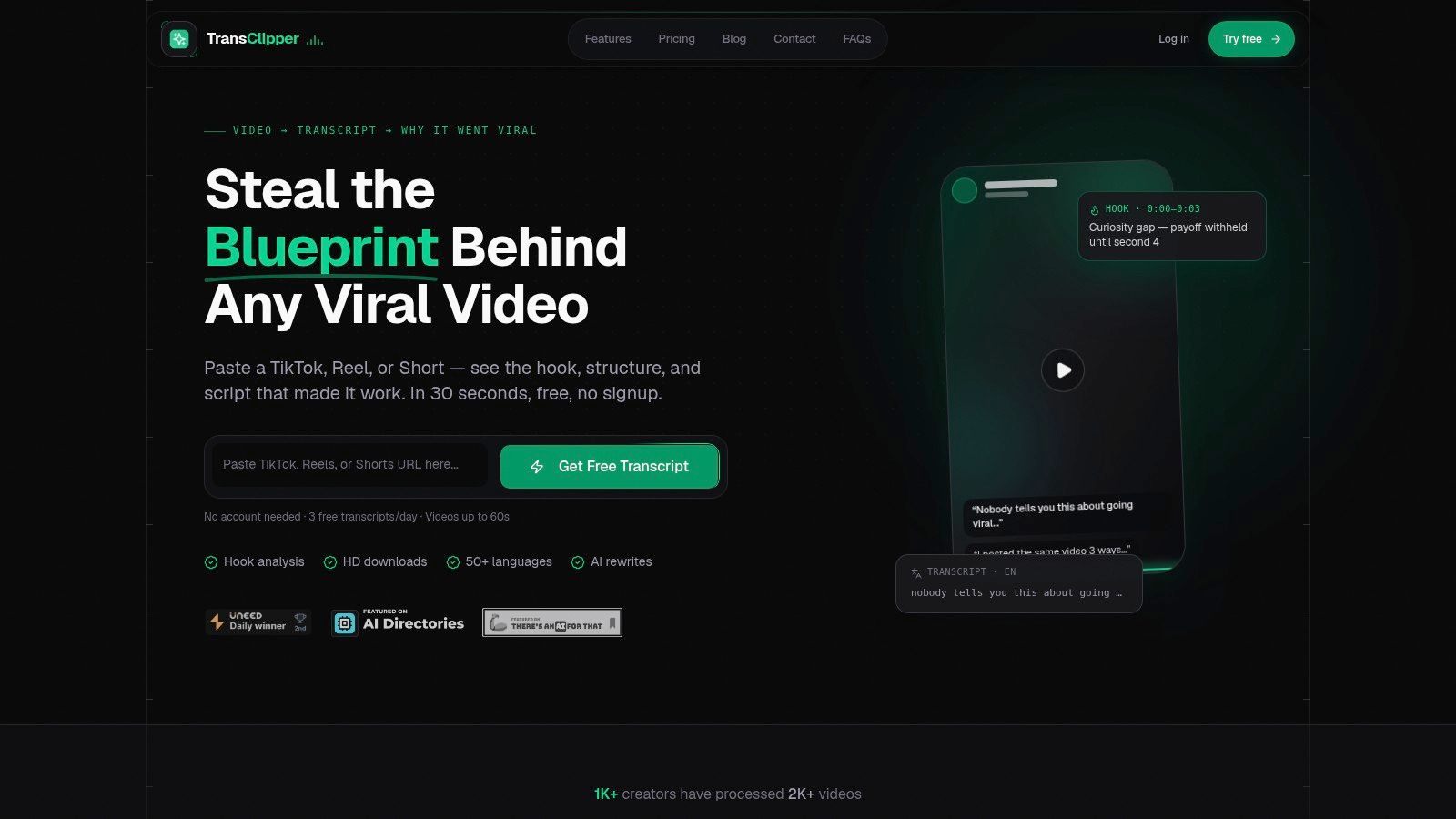
A strategist comparing dozens of TikTok clips, Instagram Reels, or YouTube Shorts needs more than a speech-to-text endpoint. TransClipper targets short-form video research: paste a public video URL and receive a transcript with analysis of the hook, narrative progression, call to action, and overall viral score. Product materials for this comparison state support for 50+ languages and typical transcript completion in 5–10 seconds.
That workflow suits rapid content screening. Bulk import handles up to 50 links, and a searchable research library stores transcripts, reports, and downloaded assets together. The Viral Hook Generator, Script Rewriter, and Virality Analyzer connect observation with production, helping a strategist examine how a clip is structured and turn the pattern into a script for testing. This is a different operating model from a general-purpose archive or call-center transcription system.
Best for pattern-led social research
The platform provides timestamps, TXT, XML, and PDF transcript exports, translation, HD downloads up to 1080p without platform watermarks, team workspaces, encrypted cloud storage, and a Transcript API. Paid plans apply fair-use limits rather than offering unlimited automated scraping, and unusually high automated activity may be throttled to protect service quality.
Practical rule: Choose TransClipper when the transcript starts a research workflow. Use another system when the transcript itself is the regulated or production-critical deliverable.
Its limitations affect implementation choices. The free tier allows 3 transcripts per day for videos up to 60 seconds. Pro and Business plans add longer clips, bulk import, AI-agent runs, team features, and larger API quotas. Silent footage, disabled captions, heavy music, poor audio, and strong accents can reduce reliability. The browser extension remains listed as coming soon. The TransClipper's AI transcription tool guide provides further workflow context.
Website: TransClipper
2. OpenAI Whisper
OpenAI Whisper is the practical choice for teams that want local control over multilingual ASR. Its open-source model and code can be run on infrastructure the team manages, which gives developers direct control over data handling, post-processing, deployment architecture, and model selection. It supports multilingual automatic speech recognition and speech translation into English, with model sizes that let teams choose between speed and recognition quality.
The appeal isn't only avoiding a per-minute vendor fee. Whisper gives engineering teams a reproducible base for custom pipelines, including diarization layers, terminology correction, storage policies, and application-specific routing. The automated video transcription guide explains the broader workflow distinction between extracting speech and turning it into a usable content asset.
The infrastructure trade-off
Local deployment transfers responsibility to the buyer. Your team must provision hardware, manage queues, handle updates, monitor failures, and decide how real-time workloads compete with batch jobs. Performance depends on the hardware and configuration, so a local model isn't automatically cheaper or faster for every workload.
Recent benchmark evidence also complicates the assumption that bigger always wins. A 2026 multilingual ASR report found average error of 16.52 for a 0.6B-parameter model, 14.85 for a 1.7B model, and 14.32 for a 10B system, while the comparison reported 33.04 for Whisper-large-v3-turbo among systems at or below 1B parameters. These results indicate that balanced training and architecture can matter as much as raw model size. Read the comparison with the best AI voice tweets for a wider view of voice tooling.
Website: OpenAI Whisper on GitHub
3. Google Cloud Speech-to-Text v2
Google Cloud Speech-to-Text v2 suits organizations solving governed cloud-scale transcription. It offers streaming and batch modes, language support across a large catalog, speaker diarization, and word-level timestamps. Those capabilities make it a natural fit for applications that need to process ongoing audio while retaining structured output for search, analytics, or downstream automation.
The key advantage is ecosystem fit. Teams already using Google Cloud can connect speech processing with existing identity controls, storage, monitoring, SDKs, and operational practices instead of creating a separate transcription environment. That reduces implementation friction for production teams, although it doesn't remove the need to validate language-specific quality.
Where buyers should look beyond the catalog
A language appearing in a support matrix doesn't tell you how the model handles an accent, a regional pronunciation, specialist vocabulary, or two speakers talking over one another. A study spanning 1,107 languages reported that about 85% met a character error rate threshold of 5% or better, but success varied by region. South American and European languages reached about 95% and 97%, while African languages reached 76%. The practical implication is that a global deployment needs language-by-language acceptance testing, not one headline accuracy score.
Google Cloud's enterprise tooling is a strength, but cost planning must include usage volume, surrounding cloud services, retention, and data movement. The service is best for teams that value managed infrastructure and operational controls more than a lightweight browser editor.
Website: Google Cloud Speech-to-Text
4. Microsoft Azure AI Speech
Microsoft Azure AI Speech is a strong option for Azure-centered and regulated enterprise environments. Its speech-to-text service supports real-time and batch transcription, speaker diarization, and language identification. The language-identification workflow is especially relevant to multilingual operations because Azure supports both at-start identification and continuous language identification for recordings where the language may change.
That distinction matters. Selecting one language before processing works for a known monolingual interview. Continuous identification is more useful when an event, support interaction, or field recording changes languages during the session. It still needs validation, because a wrong language decision can affect recognition, punctuation, speaker segmentation, and translation downstream.
Enterprise control versus pricing simplicity
Azure offers regional deployment choices and enterprise security and compliance tooling. A free monthly quota on the F0 tier can help teams test the service before committing to a larger integration. However, pricing varies by region and offer, and Azure doesn't provide one universal dollar-per-hour figure that applies to every deployment. Buyers should use the Azure pricing calculator with their target region, model, mode, and expected volume.
Custom models can help organizations adapt recognition to domain vocabulary, but customization introduces its own data, evaluation, and maintenance requirements. Azure is therefore most compelling when the organization already has Microsoft governance, procurement, and cloud engineering in place. It isn't necessarily the fastest route for a creator who needs to paste a short-form URL and receive a structured creative analysis.
Website: Microsoft Azure AI Speech
5. Amazon Transcribe
Amazon Transcribe is designed for teams building transcription into AWS data and application pipelines. It supports batch and streaming modes, automatic language identification, speaker diarization, channel separation, custom vocabularies, and language-model customization. PII redaction is particularly useful for customer-service and enterprise recordings where the transcript may move into analytics or storage systems.
The AWS integration is the main reason to select it. Audio can move through familiar services such as S3, Lambda, and other compute or analytics components, allowing engineering teams to keep ingestion, permissions, processing, and retention inside an established environment. Call Analytics is available for contact-center use cases, but it's a separate product area with its own capability and cost considerations.
Coverage requires a capability matrix
Amazon's feature availability isn't uniform across every language or region. Automatic identification, redaction, custom vocabularies, diarization, and channel handling may not all be available for the language a team prioritizes. The buyer should test the exact combination rather than treating “multilingual” as a single feature.
AWS also provides a path for teams that eventually decide managed APIs are too costly at high volume. An AWS machine-learning article describes a self-hosted Parakeet-TDT pipeline using AWS Batch, but that approach requires GPU infrastructure, deployment work, monitoring, and operational ownership. Amazon Transcribe remains the simpler choice when the team wants a managed service and predictable integration with AWS.
Website: Amazon Transcribe
6. Deepgram
Deepgram targets developers who need low-latency transcription and direct API control. Its multilingual Nova models, streaming and batch modes, automatic language detection, keyterm prompting, speaker diarization, and timestamps support applications that can't rely on a manual upload-and-edit workflow. An EU API endpoint also gives teams a data-residency option when geography affects architecture or procurement.
The right comparison isn't “Deepgram versus every other tool.” It's model against model, workload against workload. Feature availability and pricing depend on the selected Nova model and plan, so an engineering team should test recognition quality alongside latency and usage cost instead of choosing solely from a language list.
Code-switching is the real test
Deepgram stated that its February 2026 Nova-3 multilingual update produced its largest gains in code-switching scenarios and reduced word drops when languages were mixed, as described in the Nova-3 multilingual update. That focus addresses a practical weakness in multilingual transcription software. Recognizing English and Spanish separately doesn't prove that a model will preserve meaning when a speaker alternates between them in one sentence.
An independent 2026 comparison identified multilingual, code-switched, and multi-speaker audio as especially difficult real-world conditions, with model rankings shifting materially across those cases. For developers, Deepgram is attractive when the application needs streaming, programmatic controls, and scalable API access. For editorial teams that mainly need a polished review interface, the API-first design may require additional tooling.
Website: Deepgram
7. AssemblyAI
AssemblyAI is a good fit for product teams that want transcription plus language-aware analysis in one API workflow. Its batch offering supports 99 languages, while multilingual streaming support is currently narrower and covers 6 major languages, according to the product information provided for this comparison. That difference makes the model matrix more important than the top-line batch number.
The platform adds word-level timestamps, automatic punctuation, formatting, entity and keyterm detection, content safety, and topic extraction. These features help a developer move from raw speech to searchable or moderated content without assembling every NLP layer independently.
Streaming and batch coverage are different buying decisions. Test the mode your users will actually use.
Useful for enrichment, not automatic trust
AssemblyAI's documentation and quick-start experience are strengths for teams shipping a prototype or production API. Usage-based billing and free credits for new accounts lower the barrier to evaluation. But selected streaming and code-switching features are limited to certain models, so a team handling mixed-language audio shouldn't assume that batch coverage transfers directly to live transcription.
The platform works best when transcripts feed moderation, indexing, content intelligence, or application features. It is less suitable when the main requirement is a collaborative browser editor with extensive subtitle exports or a human proofreading service. Before adoption, compare the correction burden on representative recordings, especially where language changes inside a conversation.
Website: AssemblyAI
8. Sonix
Sonix is built for teams that want a polished browser workflow for transcription, translation, and subtitling. It supports AI transcription and translation in 54+ languages, with an in-browser editor that includes timestamps, speaker labeling, and a custom dictionary. Users can create subtitles, burn them into video, export through a broad set of formats, and collaborate without building an internal interface.
That makes Sonix a practical choice for creators, researchers, and production teams that value time-to-edit. The transcript isn't just an API response. It's an editable working document with search, formatting, and export options attached.
A clean editor has a volume ceiling
Sonix offers a Pay As You Go option, a 30-minute free trial, and clear plan comparisons, as described in the supplied product information. That pricing structure is easy to evaluate for occasional projects. High-volume teams should still model total spend because per-project or plan-hour costs can become less attractive than a local model or usage-based API.
Sonix's API and Zapier integrations make it more flexible than a purely manual web app, but the main value remains the editing and subtitling layer. It isn't the natural choice for a developer building low-latency recognition into a live application, and it doesn't offer the short-form-specific hook and structure analysis that distinguishes TransClipper.
Website: Sonix
9. Happy Scribe
Happy Scribe is the most flexible choice for teams that need AI transcription with optional human review. Its plan information claims AI transcription, subtitles, and translation across 150+ languages, alongside human proofreading in 60+ languages. That combination addresses a problem many multilingual teams discover late: some recordings can tolerate machine output, while others need a linguist to review names, terminology, or sensitive wording.
The browser editor supports collaboration, meeting recording and note-taking workflows, integrations with YouTube, Vimeo, Google Drive, Box, and Dropbox, plus multiple export formats. Human proofreading costs extra and is priced per minute, so it isn't a replacement for automated processing at every volume. It is a quality-control path for content where correction risk matters more than the lowest possible processing cost.
Language count isn't a quality guarantee
The distinction between claimed coverage and reliable coverage is especially important for lower-resource languages and dialects. A 2025 ML-SUPERB challenge covering over 200 language varieties reported that the best submission improved language-identification accuracy by 23% and reduced character error rate by 18% on the main set. On accented and dialectal data, it achieved 30.2% lower character error rate and 15.7% higher language-identification accuracy than the top baseline, showing that evaluation conditions can materially change results.
Happy Scribe's strongest operational advantage is the ability to route difficult work to human review. That doesn't eliminate the need for pilots, but it gives non-technical teams a fallback when automated output isn't safe to publish.
Website: Happy Scribe
10. Trint
Trint is aimed at newsrooms, editorial teams, and post-production groups that need to turn recordings into publishable stories. Its editor supports multilingual transcription, translation workflows, speaker detection, search, collaboration, and story assembly through its Stories features. Live transcription and production workflows make it more editorially oriented than a raw speech API.
The advantage appears after the first transcript arrives. Editors can search across recordings, identify relevant passages, collaborate on revisions, and assemble material for a story without moving immediately into another application. That workflow fits journalists and content teams working against deadlines, particularly when the transcript is a source for a finished narrative rather than the final archive.
Mixed-language audio needs a manual plan
Trint's stated transcription coverage varies by feature, with product materials describing 40–50+ languages. Mixed-language files may require reruns by language and manual stitching, which is a serious limitation for conversations where speakers switch languages naturally. The issue isn't whether Trint recognizes each language in isolation. It's whether the workflow preserves one coherent, searchable record when the language changes.
Subscription tiers and add-ons may also matter for high-volume or archive-heavy teams. Trint remains a strong editorial choice when collaboration, story construction, and mature editing tools outweigh the need for smooth code-switching. Teams should test multilingual interviews before committing, then measure how much manual stitching the newsroom can absorb. The broader workflow is also covered in TransClipper's best transcription software guide.
Website: Trint
Top 10 Multilingual Transcription Tools Comparison
| Product | Key features ✨ | Quality & speed ★ | Value & pricing 💰 | Best for 👥 |
|---|---|---|---|---|
| TransClipper 🏆 | ✨ 50+ lang instant transcripts, hook/structure/CTA analysis, Viral Hook Gen, bulk import (50), HD 1080p downloads, searchable library, API | ★★★★★ (most transcripts 5–10s; structured timestamps) | 💰 Free (3/day ≤60s); Pro ~$7.42/mo; Business ~$16.58/mo | 👥 Short-form creators, agencies, brand research teams |
| OpenAI Whisper | ✨ Open-source multilingual ASR, multiple model sizes, local or hosted | ★★★★☆ (strong baseline accuracy; infra-dependent) | 💰 No vendor fees self-hosted; infra/cloud costs apply | 👥 Developers, researchers needing control & privacy |
| Google Cloud Speech-to-Text (v2) | ✨ Streaming & batch, word-level timestamps, diarization, broad language set, monitoring tools | ★★★★★ (enterprise reliability & SLAs) | 💰 Published pricing; can be costly at scale | 👥 Enterprises on Google Cloud, scalable transcription needs |
| Microsoft Azure AI Speech | ✨ Real-time & batch, continuous LID, custom models, enterprise compliance & regional deployment | ★★★★☆ (enterprise-grade, region-dependent latency) | 💰 Pay-as-you-go; regional pricing varies | 👥 Regulated enterprises and Azure-centric stacks |
| Amazon Transcribe | ✨ Auto language ID, PII redaction, custom vocab, multi-channel & channel separation | ★★★★☆ (scalable AWS integration) | 💰 Pay-as-you-go with volume tiers (AWS billing) | 👥 AWS-integrated teams, contact-center use cases |
| Deepgram | ✨ Nova multilingual models, low-latency streaming, EU data-residency endpoints | ★★★★☆ (fast, cost-efficient for streaming) | 💰 Competitive list pricing; varies by model/plan | 👥 Developers needing low-latency & residency options |
| AssemblyAI | ✨ API-first, 99-language batch, streaming models, NLP add-ons (entities, topics, safety) | ★★★★☆ (robust ASR + NLP features) | 💰 Usage-based billing; free credits for new accounts | 👥 Product teams & API integrators needing NLP extras |
| Sonix | ✨ Polished in-browser editor, 54+ languages, subtitles/burn-in, team/versioning | ★★★★☆ (editor-focused UX) | 💰 Pay-as-you-go or plans; can be pricey at very high volumes | 👥 Creators, researchers, teams wanting strong editor UX |
| Happy Scribe | ✨ AI + optional human proofreading, meeting recorder, many integrations | ★★★★☆ (good AI+human workflow) | 💰 Pay-per-minute + human-proofing fees | 👥 Non-technical teams needing optional human QA |
| Trint | ✨ Live transcription, collaborative editor, story-building tools, translations | ★★★★☆ (built for editorial workflows) | 💰 Subscription tiers; add-ons for high-volume/archive | 👥 Newsrooms, production teams and editors |
Match the Tool to the Production Reality
The best multilingual transcription software depends on what happens before and after speech becomes text. A short-form strategist wants to understand hooks, pacing, narrative structure, calls to action, and patterns across a collection. A cloud platform team wants streaming endpoints, authentication, monitoring, retention controls, and predictable scaling. An editor wants a transcript that can be searched, corrected, translated, shared, and exported without engineering support. A researcher handling sensitive recordings may care more about local processing than a polished interface.
Choose TransClipper for short-form social-video research and analysis. Its focus on TikTok, Instagram Reels, and YouTube Shorts makes it more useful than a general transcript editor when the objective is to study creative mechanics and generate new hooks or scripts. Bulk imports, searchable research storage, translations, exports, and a Transcript API extend that workflow beyond one-off transcription.
Choose Whisper when local control, reproducibility, and custom infrastructure matter most. It gives engineering teams ownership of deployment and post-processing, but they must also own hardware, scaling, updates, and real-time performance. Choose Google Cloud Speech-to-Text, Microsoft Azure AI Speech, or Amazon Transcribe when governed cloud scale, enterprise controls, and existing hyperscaler infrastructure outweigh the simplicity of a specialist application.
Choose Deepgram or AssemblyAI for developer-led pipelines. Both are better suited to teams that need APIs, streaming or batch processing, structured timestamps, and application-level enrichment. Check the exact model matrix before evaluating language coverage, especially for code-switching, because batch support and streaming support can differ substantially.
Choose Sonix, Happy Scribe, or Trint when browser-based editing, subtitling, collaboration, editorial production, or optional human review is the central requirement. Happy Scribe is the clearest fit when a team needs a human-review path. Trint is more editorially focused, while Sonix offers a straightforward web-based transcription and subtitle workflow.
Before committing, build a test set from the audio your team receives. Include every priority language, regional accents, background noise, fast speech, domain vocabulary, speaker overlap, and code-switching. A 2026 analysis found a particularly severe zero-shot failure range for Pashto, a language spoken by 60–80 million people, with Whisper WER ranging from 90% to 297%, one configuration reaching 461% through decoder looping, and the best zero-shot result still at 39.7%. That evidence makes one point unavoidable: a language can have a large speaker population and still require dedicated validation.
Measure more than raw error. Compare correction effort, speaker-label quality, language-identification failures, translation needs, bulk throughput, API reliability, storage location, privacy controls, and the cost of human review. Then select the tool that fits the production reality, not the one with the most impressive language total.
TransClipper combines multilingual transcription for TikTok, Instagram Reels, and YouTube Shorts with hook, structure, CTA, and viral-score analysis, bulk research, searchable storage, translations, exports, and AI agents for script development. If your global content team needs to understand why short-form videos work and turn those findings into usable creative ideas, visit TransClipper and test the workflow with your own multilingual clips.


